How Bun.Js Has Made Javascript Fun Again
2025-12-20
JavaScript, TypeScript, Bun
6 minutes

Disclaimer: All content on this website, including all code examples, is created and written by me. No AI tools were used in the creation of any content on this site.
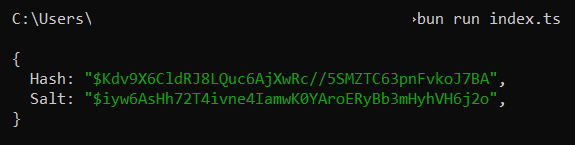
An example of what we’ll be discussing in this article:
If like me you're not a web developer, you might have missed the following announcement: "Node.js will be able to execute TypeScript files without additional configuration". Alongside the release of Node 22.18.0 came a short code snippet that showed how much simpler the whole process would now be:
echo 'const foo: string = "World"; console.log(`Hello ${foo}!`);' > file.ts
node file.ts
Long story short, running any TypeScript code using Node used to require some annoying extra configuration steps as well as a transpilation tool such as ts-node. To say that the whole experience felt unimpressive would be an understatement.
At this point, you're probably wondering why a JavaScript runtime-related announcement seems to matter to me. After all, this personal blog is mostly centered around what we could call "programming for data", and Python has progressively become the de-facto language for pretty much anything data-related.
Now I recently got myself a new laptop, and as usual when booting up a new Windows-based machine, the first thing I did was to install Chocolatey. I've become a big fan of this package manager over the years, and I highly recommend you give it a try if you haven't, as it's really helped me keep track of what's on my devices.
Back to today's article, as I was going through a list of the programs and tools that I wanted on my laptop, I found myself for the first time ever installing Bun before Python.
I had written an article on Bun in May 2024, quickly showing how to create a simple web server and use the integrated SQLite library. Fast forward to over a year later, Bun has become my default choice for pretty much any of the everyday tasks that people within my field would normally have used Python for. I'm mainly talking about simple things such as interacting with local files and folders, but also scraping and storing data, building a small dashboard, etc..
Alright, Bun is great, we get it. But why that opening paragraph on Node then? Because if it weren't missing an integrated Jupyter-like notebook environment (like the arguably limited one that Deno has), Bun would be a perfect secondary environment for any data practitioner.
Which by the way I think it already is. Let's see why!
Getting started couldn't be easier. Simply create a folder and run the following command: bun init. Bun will automatically prepare everything you need and even create an index.ts file for you, which you can run using the following command: bun run index.ts. Yup, it's that simple!
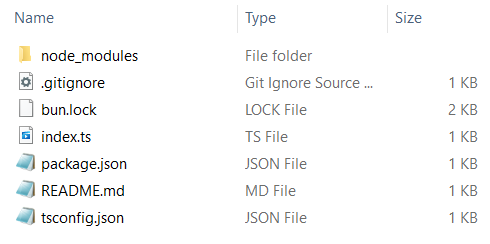
You might have noticed a json file called tsconfig.json that now sits at the root of your project folder. Here's what it looks like:
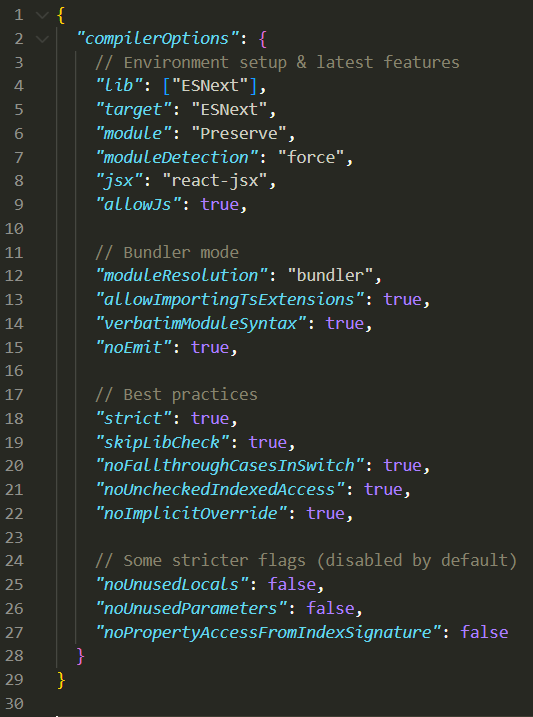
Now you could of course make a few changes to the fields you see in the screenshot above. But straight out of the box your index.ts file will execute without you having to configure anything.
Oh one last thing. Say you want to get rid of that project and whatever package you have installed? Fine, just delete the folder we created earlier. If you're coming from Python, what we just did isn't too different from creating a virtual environment using the python -m venv .venv command.
In other words, you'll be feeling right at home!
The first thing that comes to the mind of any developer whenever JavaScript (or TypeScript) gets mentioned, is web development. And indeed, Bun is primarily aimed at those of us that want to build professional-level web applications. Now one of the major differences with Node, is that Bun comes preloaded with a ton of utilities whose goal is to make the life of every developer much easier.
Personally, if I were to pick the top features that have made me fall in love with Bun I would probably list these two:
Alright, I've never liked Bash. Or rather, I've never made the effort of learning Bash. I do like my Unix commands though, but unless you install Git Bash or Cygwin they're pretty much useless on Windows devices.
This is where Bun comes to the rescue, by allowing you to run your favourite Unix commands directly from a JavaScript or TypeScript file. To do so, simply import the $ module and use template literals:
import { $ } from "bun";

await $`ls -l`;
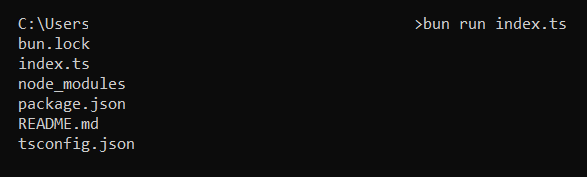
Back to what we were discussing a couple of minutes ago, we can of course create some files and folders:
import { $ } from "bun";
import { readdir } from "node:fs/promises";
import { join } from "node:path";

const CURRENT_FOLDER: string = import.meta.dir;
const TARGET_FOLDER: string = join(CURRENT_FOLDER,"Test");
const TEXT_FILES: string[] = ["file1.txt","file2.txt","file3.txt"];

try {
    await $`mkdir ${TARGET_FOLDER}`;
}
catch(err) {
    console.log(`Folder ${TARGET_FOLDER} can't be moved.`)
};

const createTextFiles = async (files_to_create: string[], where: string): Promise<void> => {
    for (let f of files_to_create) {
        const path_to_file: string = join(where,f);
        await $`touch ${path_to_file}`;
    }
};

createTextFiles(TEXT_FILES,CURRENT_FOLDER);
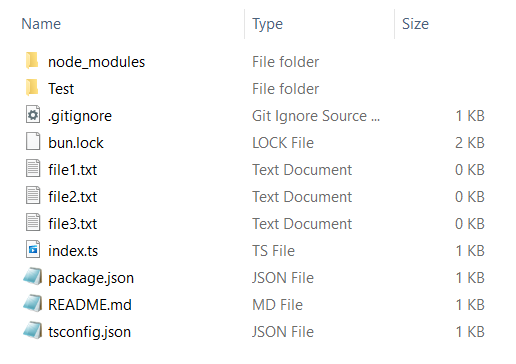
And then move these files somewhere else to:
import { $ } from "bun";
import { readdir } from "node:fs/promises";
import { join } from "node:path";

const CURRENT_FOLDER: string = import.meta.dir;
const TARGET_FOLDER: string = join(CURRENT_FOLDER,"Test");
const ALL_FILES: string[] = await readdir(import.meta.dir);

 const moveTextFiles = async (files_to_move: string[], from: string, to: string): Promise<void> => {
    for (let f of files_to_move) {
        if (f.endsWith(".txt")) {
            const source_file: string = join(from,f);
            const target_file: string = join(to,f);
            await $`mv ${source_file} ${target_file}`;
        }
    }
 };

moveTextFiles(ALL_FILES,CURRENT_FOLDER,TARGET_FOLDER);
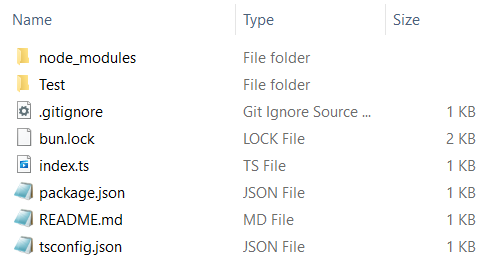
That's arguably pretty neat, and it will work whether you're on Windows, Linux or macOS. You can use grep, pipe operators, etc..
Now you might wonder, why not use Python for this type of tasks? Both the sys and shutil modules provide the same functionalities. Fair enough. I guess that for me, the reason is simply that my love of TypeScript has grown over the years and I now prefer its syntax over Python's.
We won't be discussing Bun's SQLite integration in too much details today as we went through a few examples in a previous article. All we need to know is that opening or creating a database is really straightforward, as you can see from the documentation page:
import { Database } from "bun:sqlite";

const db = new Database("mydb.sqlite");
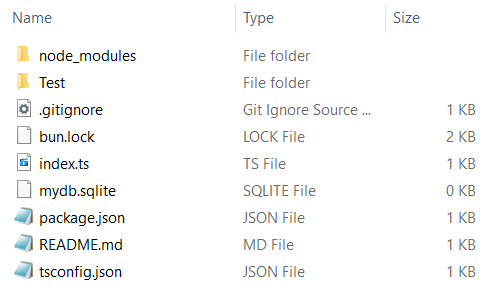
We can then of course create some tables and insert data into them. Writing SQL queries and saving their output into whatever format we want to is also as easy as can be. As someone who likes to save pretty much anything into SQlite databases, this feature comes in really handy. Feel free to check out this short video if you want to know more:
One last thing before we move on: Bun also natively supports all types of file formats. Not just json, but also yaml and toml. To see how this works, let's create a simple yaml file and place it at the root of our project folder:
Article1:
  - name: bun_js
  - type: "guide"
Article2:
  - name: phishy_phishy
  - type: "package"
Opening local files with Bun is a lot simpler than doing it the Node way:
const file_raw: Promise<string> = Bun.file("article.yaml").text();
const file_as_string: string = await file_raw;
console.log(file_as_string);
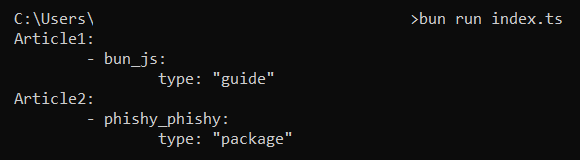
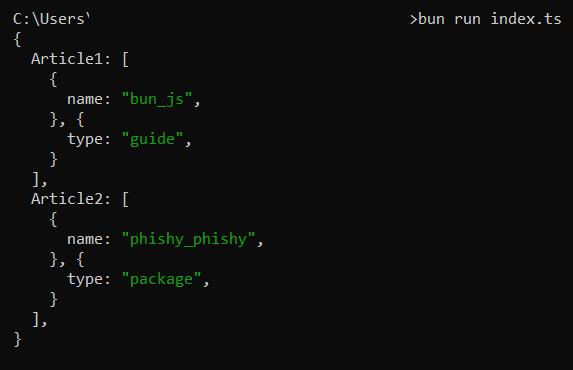
We have successfully opened our yaml file, but it's currently loaded into memory as a string variable. Accessing the various elements of our yaml tree might prove a bit difficult without a third party package, but Bun provides a simple yet efficient parser for us to use:
import { YAML, file } from "bun";

const file_raw: Promise<string> = await file("./article.yaml").text();
const file_as_yaml: any = YAML.parse(file_raw);
console.log(file_as_yaml);
These are only two of the many utilities that you'll get access to straight out of the box. And here are a few more:
Developers looking to build CLI applications or anything that involves interacting with various APIs and databases should seriously consider switching to Bun.
If you're still not entirely coonvinced, here's a practical example. I've recently gone back to university, and had to take a module on cryptography. Rather than relying on Python's Cryptography library, whose documentation I found quite confusing, I ended up writing all my assignments using TypeScript.
To encode a string using any of the algorithms that are currently considered secure, simply use Bun.password():
const hashString = async (text_to_hash: string, algorithm: any): Promise<string> => {
    let hashed_text: any = await Bun.password.hash(
        text_to_hash, {
            algorithm: algorithm,
            memoryCost: 4,
            timeCost: 3,
        }
    );
    return hashed_text;
};

const plain_text: string = "Hi mom!";
const hashed_text: string = await hashString(plain_text,"argon2id");
console.log(hashed_text);

The parameters we passed in the memoryCost and timeCost fields are the default ones, and as you can see our function returned a bunch of useful stuff in string format: the hashing algorithm we used, our hash and salt, etc..
Now if all we want is to extract the aforementioned hash and salt, we can write a simple parsing function:
type ParsedHash = {
  [key: string]: string;
};

const hashString = async (text_to_hash: string, algorithm: any): Promise<string> => {
    let hashed_text: any = await Bun.password.hash(
        text_to_hash, {
            algorithm: algorithm,
            memoryCost: 4,
            timeCost: 3,
        }
    );
    return hashed_text;
};

const parseHashedString = (data: string): ParsedHash => {
    let hash_as_array: string[] = data.split("$");
    let array_length: number = hash_as_array.length;
    let result: ParsedHash = {
        "Hash": `\$${hash_as_array[array_length-1]}`,
        "Salt": `\$${hash_as_array[array_length-2]}`
    }
    return result;
};

const plain_text: string = "Hi mom!";
const hashed_text: string = await hashString(plain_text,"argon2id");
const parsed_hash: any = parseHashedString(hashed_text);
console.log(parsed_hash);
You'll find more examples provided through the "hashing" documentation page, and they're all as straightforward and easy to implement as what we just did.
I first started using Bun in late 2023 because I was hoping that it would solve the main issue that I had always had with Node: having to go through a cumbersome configuration process before being able to write any line of code.
I could have picked Deno, another growingly popular JavaScript runtime. But as discussed throughout this article, I ended up falling in love with how friendly Bun is to all developers regardless of their field of expertise.
Almost two years later, I've almost completely ditched Python except for some very specific cases where I can't find a corresponding npm package.